Skip to content Skip to footer

Calculation of qualification

Calculate your scores for qualification
in the GFS Travel Contest

Insurance of persons

  1. Open Centralize here

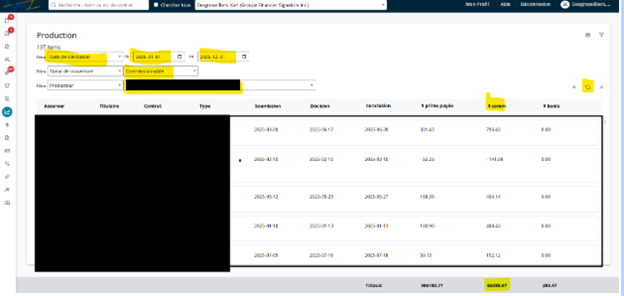
2. Select PRODUCTION

3. Change the following settings:

    • Date type: Conclusion date
    • Period: from 01/01 to 12/31
    • Coverage status: Commissionable
    • Producer: You
4. Locate the $ COMM column 5. Take the total at the bottom of the column
Calculating points:

Total commissions × 2.5

Example: $65,385 × 2.5 = 163,463 points

Investments – VieFUND (mutual funds and segregated funds)

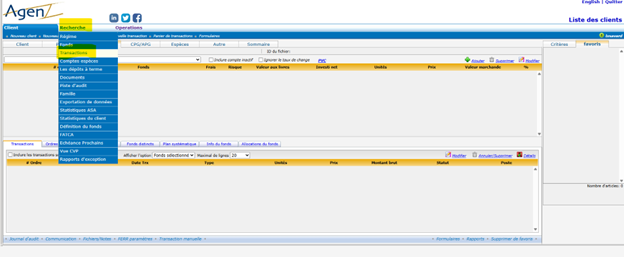
  1. Open your VieFUND platform MUTUAL FUND or SEPARATE FUND
  2. Select Mutual Fund or Segregated Fund
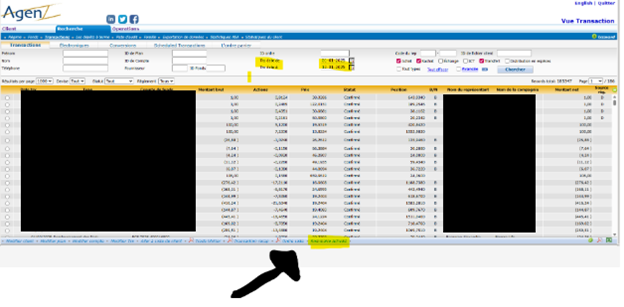
  3. Click on Search, then Transactions
4. Change the dates:
    • From 01-01 to 12-31
5. Click on Activity Summary

6. Click OK


File download
  1. Download the Excel file
2. Extract the file from the ZIP 3. Open Excel 4. Go to Data 5. Click on From Text/CSV File 6. Select the ACTIVITY BY REP CODE file

7. Click Load


Calculation of points:
  1. Locate the AMOUNT column
2. Apply the following calculation:

Total amount × 2%

Example: $723,243 × 2% = 14,465 points

E-mail
Password
Confirm Password