
Investment Funds in Canada
Link for Preferred Corporate Pricing
Corporate Pricing - SeeWhy Learning
1
Find the Logo
Find the Signature Financial Group logo in the corporate pricing list.
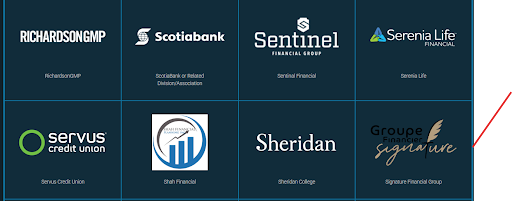
Find the Logo
2
Complete the Form
Complete the requested information in the Signature Financial Group form.
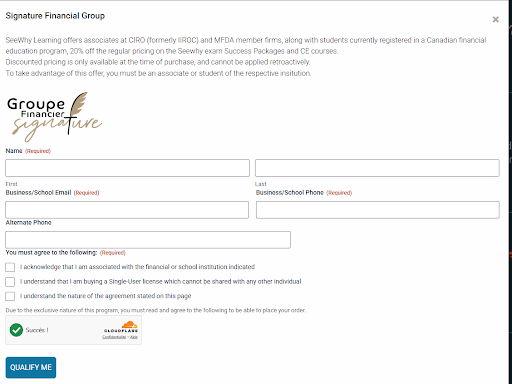
Complete the Form
3
Use the "Qualify Yourself" Button
After completing the form, click the "Qualify Yourself" button.
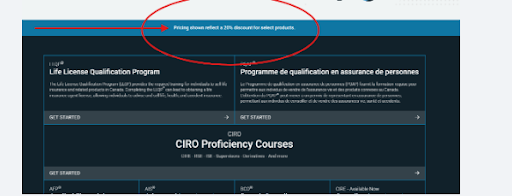
Use the "Qualify Yourself" Button
4
Open the Menu and Find the "Canadian Investment Regulator Exam" Course
Open the course menu and select the Canadian Investment Regulator Exam course.
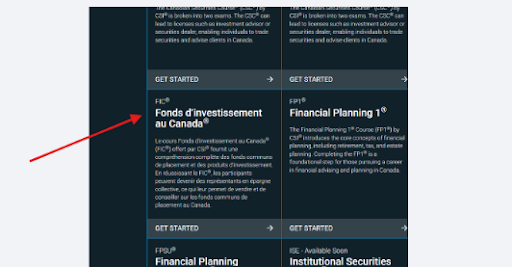
Open the Menu and Find the "Canadian Investment Regulator Exam" Course
5
Order Now
Once you have selected the correct course, proceed to the order page.

Order Now